
Mime Types
Look up the MIME type (Content-Type) for a file extension, or find which extensions use a given MIME type. The table covers the formats web developers meet most — web pages, scripts, data, images, fonts, audio, video, documents and archives — with notes on charset, legacy types and how to configure your server.
- Free to use
- No sign-up
- Runs in your browser
MIME type lookup
| Extension | MIME type | Description |
|---|
Web Server Headers & MIME Reference
Printable MIME types chart for web developers, HTTP security headers cheat sheet, caching headers reference and a deployment headers checklist.
- MIME types chart (PDF, XLSX)
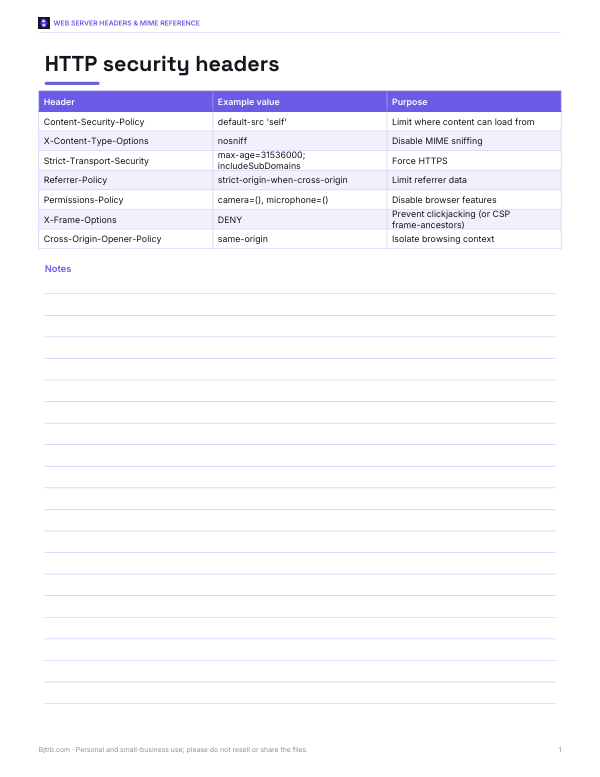
- Security headers (PDF)
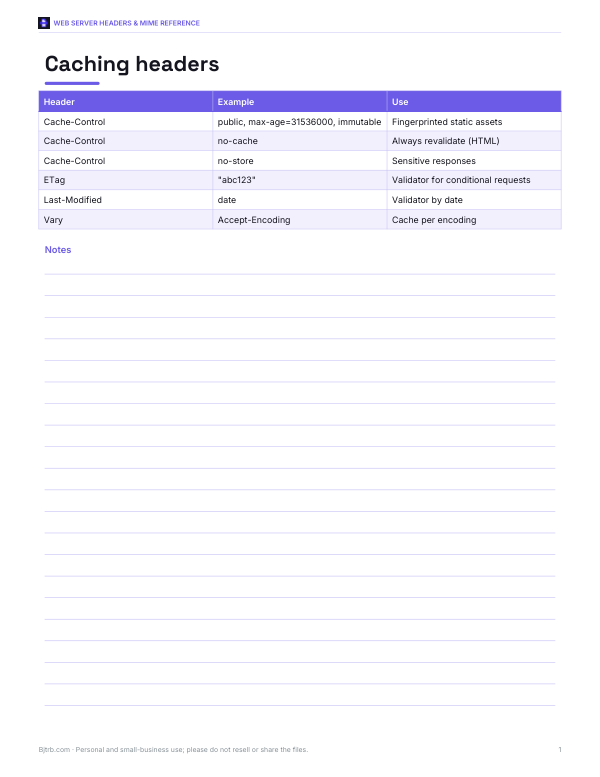
- Caching headers (PDF)
- Deployment checklist (PDF, DOCX)
Formats: PDF, XLSX, DOCX. Instant download after payment (link valid 72 hours, up to 5 downloads). AI-assisted: the templates were drafted with AI help and reviewed and laid out before publishing.
$5.00 USD, one-time 4 files · about $1.25 each
- Instant download
- 7-day refund
- Secure checkout by Stripe
7-day money-back guarantee. Full refund within 7 days of purchase, even after you download.
Free sample: Caching Headers Reference (PDF, 60 KB)
Full refund within 7 days — see the refund policy and license.
Free printables
Single sheets you can print right now, no sign-up. The full pack adds every sheet in one download plus the editable files.
 Deployment Checklist for Headers
What a MIME type is
A MIME type (also called a media type or content type) is a label such as text/html or image/png that tells software what kind of data a file or message contains. It has a type and a subtype separated by a slash, and sometimes parameters such as charset=utf-8. Web servers send it in the Content-Type HTTP header, and browsers use it — not the file extension — to decide whether to render a page, run a script, display an image or offer a download. The official list of media types is maintained by IANA.
The top-level types
| Type | Contains | Examples |
|---|---|---|
| text | Human-readable text | text/html, text/css, text/csv, text/plain |
| image | Images | image/png, image/jpeg, image/webp, image/svg+xml |
| audio | Sound | audio/mpeg, audio/ogg, audio/wav |
| video | Video | video/mp4, video/webm |
| font | Font files | font/woff2, font/ttf |
| application | Everything else, including binary and structured data | application/json, application/pdf, application/zip |
| multipart | Several parts in one message | multipart/form-data (file uploads) |
MIME types web developers need most
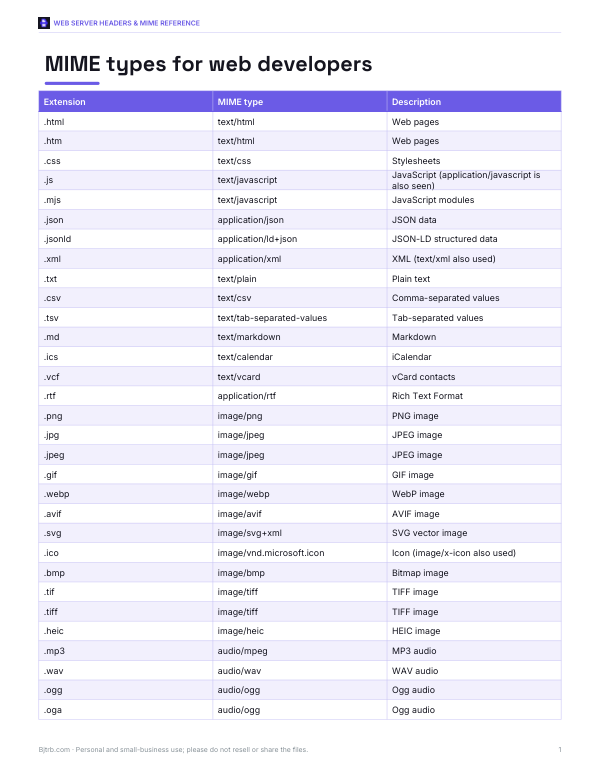
| File | Content-Type |
|---|---|
| .html | text/html; charset=utf-8 |
| .css | text/css |
| .js / .mjs | text/javascript |
| .json | application/json |
| .svg | image/svg+xml |
| .webp | image/webp |
| .avif | image/avif |
| .woff2 | font/woff2 |
| .wasm | application/wasm |
| .webmanifest | application/manifest+json |
| .xml / sitemap | application/xml |
| application/pdf | |
| Unknown binary | application/octet-stream |
For JavaScript, text/javascript is the current standard (RFC 9239); application/javascript is still widely seen and accepted. For icons, image/vnd.microsoft.icon is registered but image/x-icon is common in practice.
Why the correct MIME type matters
- Security — with the
X-Content-Type-Options: nosniffheader, browsers refuse to run scripts or apply stylesheets served with the wrong type, which blocks some attacks. - Modules and WebAssembly — JavaScript modules and
WebAssembly.instantiateStreamingrequire correct types. - Downloads — a PDF served as text/plain shows as garbage; an Excel file served as application/octet-stream downloads instead of opening.
- Fonts — some browsers reject fonts with wrong types or without CORS headers.
- Caching and compression — CDNs often decide what to compress by content type.
Setting MIME types on common servers
Nginx reads mime.types and you can add entries in a types { } block, for example application/manifest+json webmanifest;. Apache uses AddType application/wasm .wasm in the configuration or .htaccess. Node.js frameworks usually rely on a MIME library; set res.type() or the Content-Type header explicitly for custom responses. Static hosting and CDNs generally detect types from extensions; check the response headers in your browser’s developer tools (Network tab) to confirm.
Charset and text types
Text-based types should declare their character encoding, almost always UTF-8: Content-Type: text/html; charset=utf-8. Without it, browsers may guess and display accented characters incorrectly. JSON is defined as UTF-8 by its standard, so a charset parameter is not required, though it is harmless.
Worked example
After deploying a progressive web app, the browser console warns that the manifest has the wrong MIME type and WebAssembly fails to stream. Looking up .webmanifest gives application/manifest+json and .wasm gives application/wasm. Adding both to the server’s MIME configuration and redeploying fixes the warnings, and X-Content-Type-Options: nosniff is added so browsers never guess.
Uploads and user files
Never trust the MIME type or extension of a file a user uploads — both are chosen by the client. Validate uploads on the server by checking the file’s actual content (magic bytes), restrict the types you accept, and serve user uploads with Content-Disposition: attachment or from a separate domain, so a disguised HTML or SVG file cannot run scripts on your site.
MIME types in email and APIs
MIME was originally designed for email — the name stands for Multipurpose Internet Mail Extensions — and it is still how email clients know that an attachment is a PDF or an image. Multipart emails use multipart/mixed or multipart/alternative to hold several parts, such as plain-text and HTML versions of the same message. In APIs, clients send an Accept header listing the types they can handle, and servers reply with a matching Content-Type; APIs often use vendor types such as application/vnd.example+json for versioning.
Structured syntax suffixes
Many types end in a suffix such as +json, +xml or +zip, which tells software the underlying format even if it does not know the specific type. application/ld+json is JSON, image/svg+xml is XML, and application/epub+zip is a ZIP archive. Generic tools can therefore still parse or inspect the content.
Privacy
The lookup table is built into this page; searches run in your browser and nothing is sent to a server.
Frequently asked questions
What is the MIME type for JSON?
application/json.
What is the MIME type for JavaScript?
text/javascript is the current standard; application/javascript is also accepted.
What MIME type should I use for unknown files?
application/octet-stream, which tells browsers to download the file.
What is the MIME type for .docx?
application/vnd.openxmlformats-officedocument.wordprocessingml.document.
What does X-Content-Type-Options: nosniff do?
It stops browsers guessing a file’s type, so scripts and styles must be served with the correct type.
Who maintains MIME types?
IANA keeps the official media types registry.
What MIME type is used for form uploads?
multipart/form-data for forms that include files; application/x-www-form-urlencoded for simple forms.
Is the file extension enough to know the type?
Usually for serving your own files, but never for user uploads — check the content.